> For the complete documentation index, see [llms.txt](https://docs.easto.io/llms.txt). Markdown versions of documentation pages are available by appending `.md` to page URLs; this page is available as [Markdown](https://docs.easto.io/admin/how-to-create-the-pre-paid-function-in-the-app.md).
# How to create the “Pre-paid” function in the app?
Let's explore the advanced function of the Subscription by BSS app. It is **Prepaid**.
You can set up a **Prepaid** subscription with which customers can pay for multiple orders upfront and still receive the delivery on a subscription interval.
Please follow this 4-step process to activate the pre-paid function in your store and enjoy its helpfulness:
**BACKEND SETTINGS**
**Step 1: Create Subscription Plan**
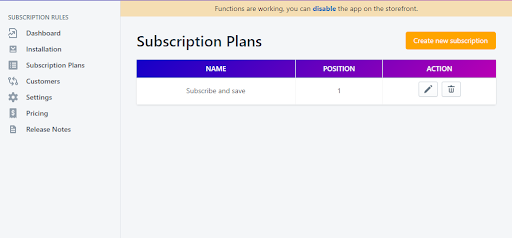
**Subscriptions Plans** -> click button "**Create new subscription plan**"
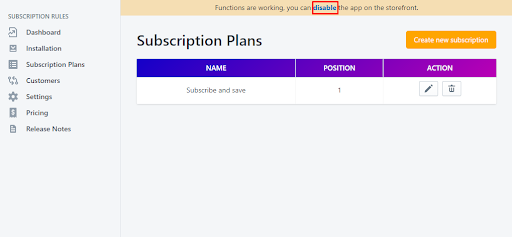
You will be redirected to a new window that will let you fill in the required information to create a subscription plan.\
\*Remember to enable the app to make functions working on your storefront on Settings
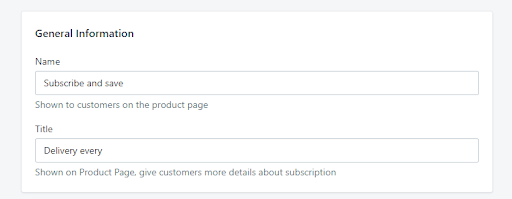
**Step 2: Enter General Information**
Under General Information section:
**Step 3: Setting Prepaid Option**
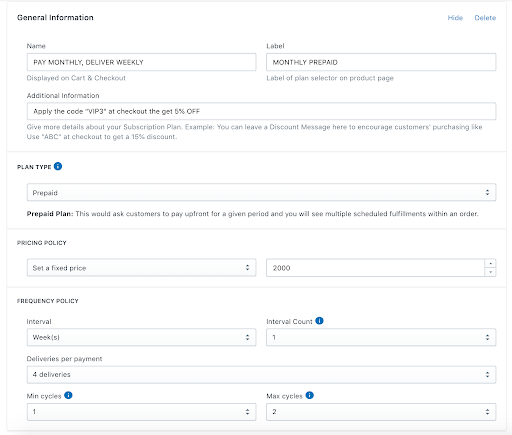
Under Plan section:
* *Plan Name:* Displayed on Cart & Checkout
* *Label:* Label of plan selector on product page
* *Position:* in case you have any plan, this setting will be used to sort order
* *Description:* Give more details about your selling plan
Under Plan type.
There are now 2 options in the Plant type: [Pay as you go](https://wiki.bsscommerce.com/docs/shopify-subscriptions-recurring-pay/app-features-how-to/how-to-create-a-subscription-plan/) and Prepaid. Pay as you go is the traditional function that you have used, and Prepaid is the brand new one that we are going to explore.
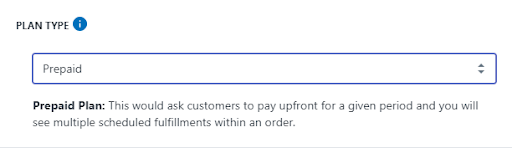
If choosing Prepaid, instead of paying when the bill comes, customers will now have to pay upfront for a given period. Besides, the list of their all subscriptions will have multiple scheduled fulfillments.

* Pricing policy: Define your subscription plan's price.
*+ Set a fixed price:* Set up a fixed subscription price.
*+ Percentage Off (%):* The subscription price is discounted by a specific percentage based on regular prices.
*+ Amount Off:* The subscription price is discounted by a specific amount based on regular prices.
* Frequency Policy:
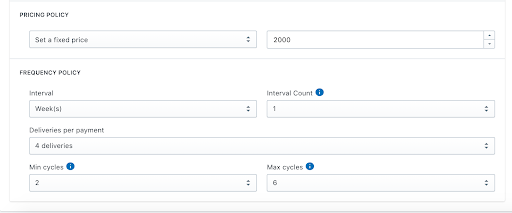
*+ Interval - Interval count:* Define the recurring delivery as days/weeks/months/years
*+ Deliveries per payment:* The number of deliveries customers have to pay for in advance.
When a customer chooses the Prepaid option, meaning that they will pre-pay $2000 for 4 subscription orders. Each order will be delivered weekly.
\+ *Min cycles*: The min payment circles customers have to fulfill before they can cancel the subscription.
When the min cycle is 2, it means that customers have to pay upfront at least 2 times. Unless meeting that requirement, they can not cancel the subscription (the cancel button does not appear in their My Subscription).
\+ *Max cycles*: The max payment circles customers have to fulfill. After reaching this point, the subscription will be automatically canceled.
For example, when the max cycle is 6, customers who pay 6 times already will not receive any other bill, and if they want to continue the delivery, they have to place a new subscription.
**FRONTEND DISPLAY**
#### 1. On Product Page
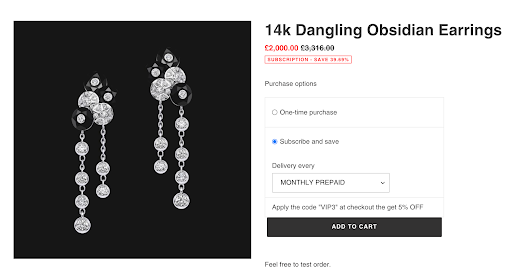
When a customer chooses the Prepaid option, meaning that they will pre-pay $2000 for 4 subscription orders. Each order will be delivered weekly.
#### 2. On My Subscription
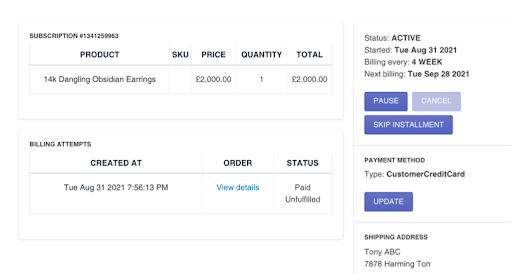
Since the min cycles are 2, when the customer placed the first subscription order, he/she cannot cancel the subscription.
#### 3. The Subscription Order Detail
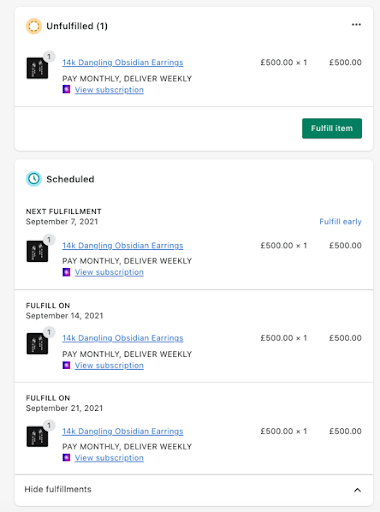
Since the deliveries per payment are 4 - there are 3 scheduled items to fulfill within 4 weeks.
#### 4. The Subscription Detail on The App
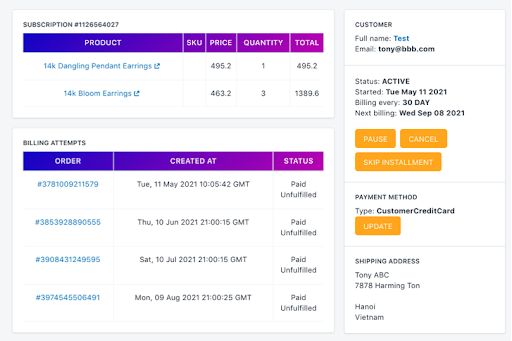
In the app, the subscription information is also saved. The store owner can still cancel the orders in the admin.
If you have further questions, feel free to contact us at [**support-sbc@bsscommerce.com**](mailto:support-sbc@bsscommerce.com)**.**