> For the complete documentation index, see [llms.txt](https://docs.easto.io/llms.txt). Markdown versions of documentation pages are available by appending `.md` to page URLs; this page is available as [Markdown](https://docs.easto.io/features/build-a-box.md).
# Build-A-Box
Your flexible box builder - craft personalized subscription boxes that delight and retain.
## 1. **Introduction:**
The **Build-A-Box** feature lets you create customized subscription bundles using either Static or Dynamic box types.
* **Dynamic Box:** Allows customers to build their own subscription box with configurable minimum and maximum item limits, while seeing live, tiered discounts update in real time as they add items - ideal for driving higher engagement and upsell.
* **Static Box:** Offers predefined box sizes at fixed price ranges, letting customers choose a box size first and then select items within the allowed quantity - perfect for simple, predictable pricing and an easy buying experience.
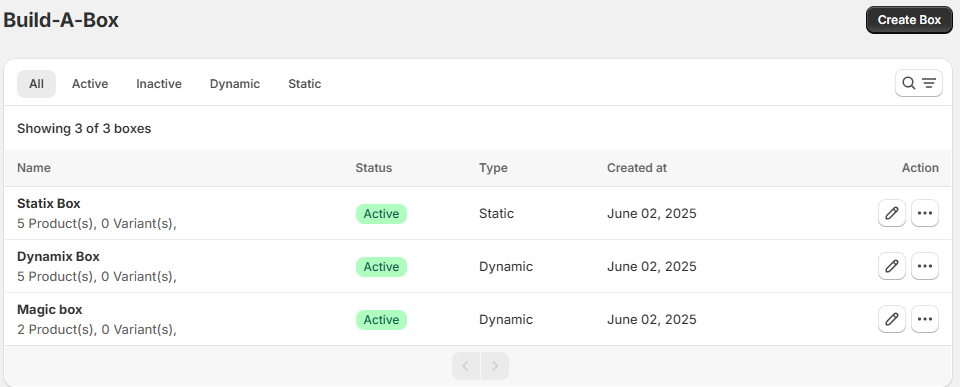
You can view, manage, and edit all your boxes here, track their **status** (Active/Inactive), and sort by box type. Use the **Create Box** button to launch new offerings that drive engagement and retention.
Perfect for businesses offering meal kits, self-care sets, subscription bundles, or any repeatable mix of products.
## **2. How to use:**
For detailed instructions about how to use each type of box: dynamic and static, please go to the next 2 articles!
Want to translate Build-a-box page? See [Translation feature here](/features/email-notifications/translation.md)
*If you need help, feel free to reach out to us via in-app* [***Live chat***](https://go.crisp.chat/chat/embed/?website_id=c4ae10a3-f762-4968-b35a-c931caf62a96)***,*** [***Book a call***](https://calendly.com/easto-support/30min) *or at* [***support@tech-arms.io***](mailto:support@tech-arms.io)***.***