> For the complete documentation index, see [llms.txt](https://docs.easto.io/llms.txt). Markdown versions of documentation pages are available by appending `.md` to page URLs; this page is available as [Markdown](https://docs.easto.io/resources/special-groups-policy/early-adopter-user-policy/campaign-discounts.md).
# Campaign discounts
Use Campaign Discounts to Save on Your Subscription
### 1. Introduction
From time to time, TA Subscriptions App runs special promotional campaigns for merchants during major occasions such as New Year, Christmas, Black Friday, and other seasonal events.\
These campaigns come with exclusive discount codes that help you save on your subscription plans.
Campaign discount codes are displayed directly inside the app - on banner notifications and on the Pricing Plans page - so you never miss an opportunity to upgrade or renew at a better price.\
Applying the discount is quick and doesn’t require any technical setup.
### 2. Step-by-step Guide
Follow these steps to apply a campaign discount to your subscription plan:
{% stepper %}
{% step %}
### **Find the campaign discount code**
When a campaign is active, you’ll see a banner displaying the discount code on:
* The **Dashboard**
* The **Pricing Plans** page
Carefully copy the discount code shown in the banner.
{% endstep %}
{% step %}
### **Choose a subscription plan**
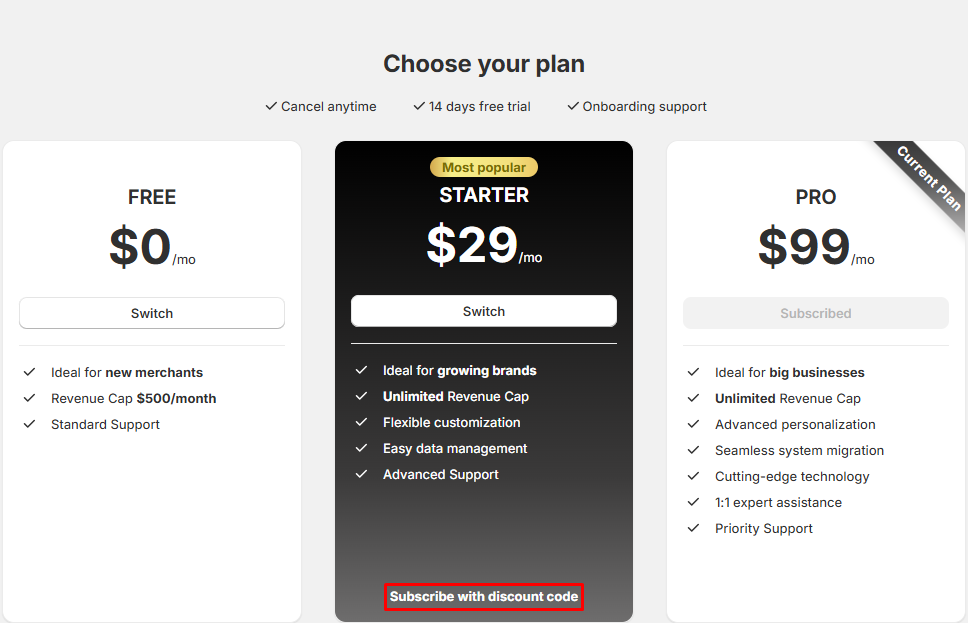
Go to the **Pricing Plans** page and select the plan you want to subscribe to or upgrade to.
Click on **Subscribe with discount code** under the selected plan.
{% endstep %}
{% step %}
### **Apply the discount code**
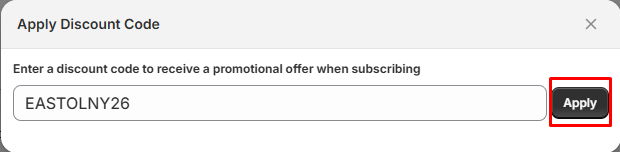
A discount field will appear:
1. Paste the copied campaign code into the field
2. Click **Apply**
If the code is valid, the discounted price will be applied immediately.
{% endstep %}
{% step %}
### **Complete checkout**
After applying the discount:
* Proceed to **Shopify Checkout**
* Review the discounted price
* Complete the payment as usual
Once checkout is complete, your subscription will be activated with the campaign discount applied.
{% endstep %}
{% endstepper %}
### 3. Tips
💡 **Campaign discounts are time-limited**\
Most campaign codes are only valid for a specific period. Make sure to apply them before they expire.
💡 **One code per subscription**\
Each subscription can only use one discount code at a time. Campaign discounts cannot be combined with other offers.
💡 **Check banners regularly**\
Campaign discount codes are announced via in-app banners — checking your dashboard ensures you don’t miss special deals.
💡 **Apply before checkout**\
Discount codes must be applied **before** completing Shopify Checkout. Once the payment is processed, the discount cannot be added retroactively.
*If you need help, feel free to reach out to us via in-app* [***Live chat***](https://go.crisp.chat/chat/embed/?website_id=c4ae10a3-f762-4968-b35a-c931caf62a96)***,*** [***Book a call***](https://calendly.com/easto-support/30min) *or at* [***support@tech-arms.io***](mailto:support@tech-arms.io)***.***