> For the complete documentation index, see [llms.txt](https://docs.easto.io/llms.txt). Markdown versions of documentation pages are available by appending `.md` to page URLs; this page is available as [Markdown](https://docs.easto.io/features/analytics/overview.md).
# Overview
Your command center at a glance.
### 1. Introduction:
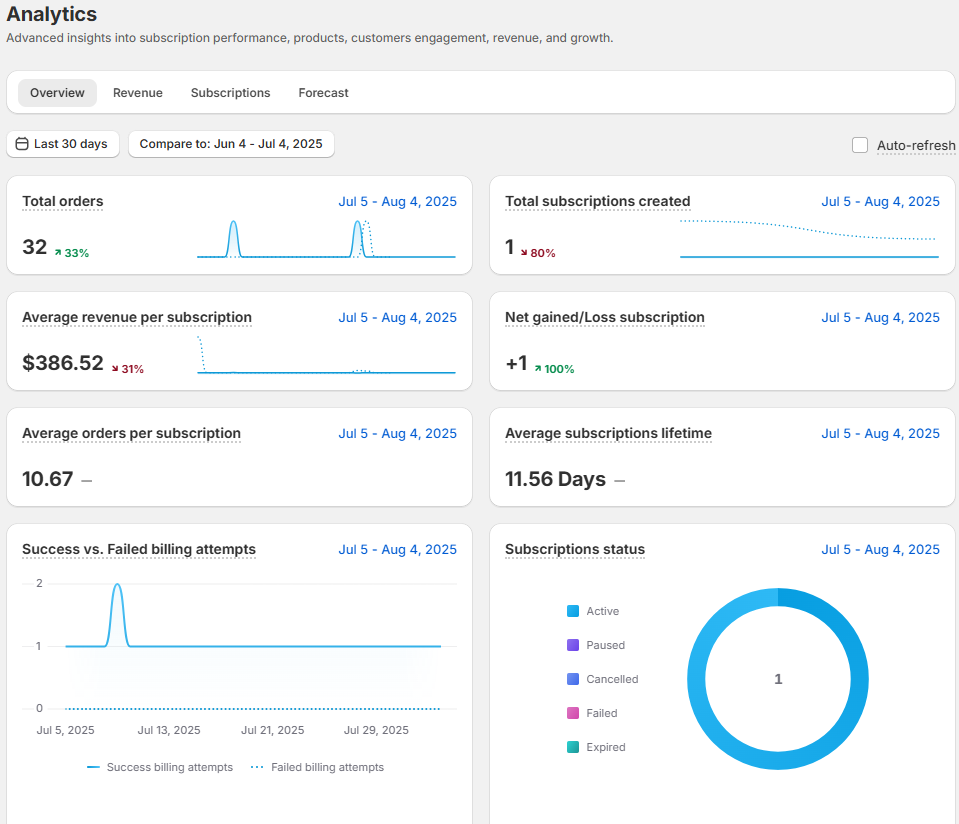
The **Overview** tab gives you a quick read on your store’s performance. It highlights total orders, new subscriptions, average revenue, and customer activity within any date range.
Use it to:
* Track growth across new, active, and lost subscriptions
* Monitor customer engagement and billing success
* Spot early signs of churn
* Compare performance across time periods
Ideal for quick health checks and high-level planning.
### 2. How to use:
Below is a simple explanation of each metric shown in this section, so you can quickly understand what the numbers mean and how to use them in your analysis:
* **Total orders**: shows the total number of orders processed during the selected date range. This metric includes *both first-time orders and recurring subscription orders.*
* Initial Orders are the very first purchases made when a customer starts a subscription.
* Recurring Orders are all follow-up charges that happen automatically after the initial order, based on the subscription schedule.
Together, these two types give you a complete picture of how many subscription-related orders your store has processed within the selected period.
* **Total Subscriptions Created**\
The total number of subscription contracts created within the selected period, regardless of their current status (active, paused, or canceled).
* **Average Lifetime Revenue**\
The average total revenue generated by subscriptions created during the selected period. This calculation includes all contracts, no matter whether they are currently active, paused, or canceled.
* **Net Gained / Lost Subscriptions**\
The overall change in your active subscriptions during the selected period.\
It is calculated as:\
*Active subscriptions at the end of the period – Active subscriptions at the beginning of the period.*\
A negative number means you lost more active subscriptions than you gained.
* **Average Orders per Subscription**\
The average number of successfully completed orders per subscription, calculated up to the end of the selected period.
* **Average Subscription Lifetime**\
The average length of time a subscription remains active, measured up to the end of the selected period.
* **Successful vs. Failed Billing Attempts**\
A comparison between successful and failed billing attempts within the selected date range. This helps you assess payment performance and identify potential billing issues.
* **Subscription Status**\
The number of subscription contracts created during the selected period, grouped by their current status (active, paused, canceled, etc.).\
You can filter this data by contract creation date for more detailed insights.
> 💡 **Tip:** Use these metrics together to understand not just growth, but also retention, billing health, and overall subscription performance.
*If you need help, feel free to reach out to us via in-app* [***Live chat***](https://go.crisp.chat/chat/embed/?website_id=c4ae10a3-f762-4968-b35a-c931caf62a96)***,*** [***Book a call***](https://calendly.com/easto-support/30min) *or at* [***support@tech-arms.io***](mailto:support@tech-arms.io)***.***