> For the complete documentation index, see [llms.txt](https://docs.easto.io/llms.txt). Markdown versions of documentation pages are available by appending `.md` to page URLs; this page is available as [Markdown](https://docs.easto.io/features/analytics/subscriptions.md).
# Subscriptions
The heartbeat of your recurring business.
### 1. Introduction:
The **Subscriptions** tab gives you deep visibility into subscriber activity and retention. Watch daily trends, measure churn, and track recurring orders.
Use it to:
* Monitor active, paused, canceled, and reactivated subscriptions
* Detect churn and failed billing early
* Understand cancellation patterns and lifecycle behavior
* Improve retention with data-backed decisions
Stay ahead of subscriber shifts and build a more loyal base.
### 2. How to use:
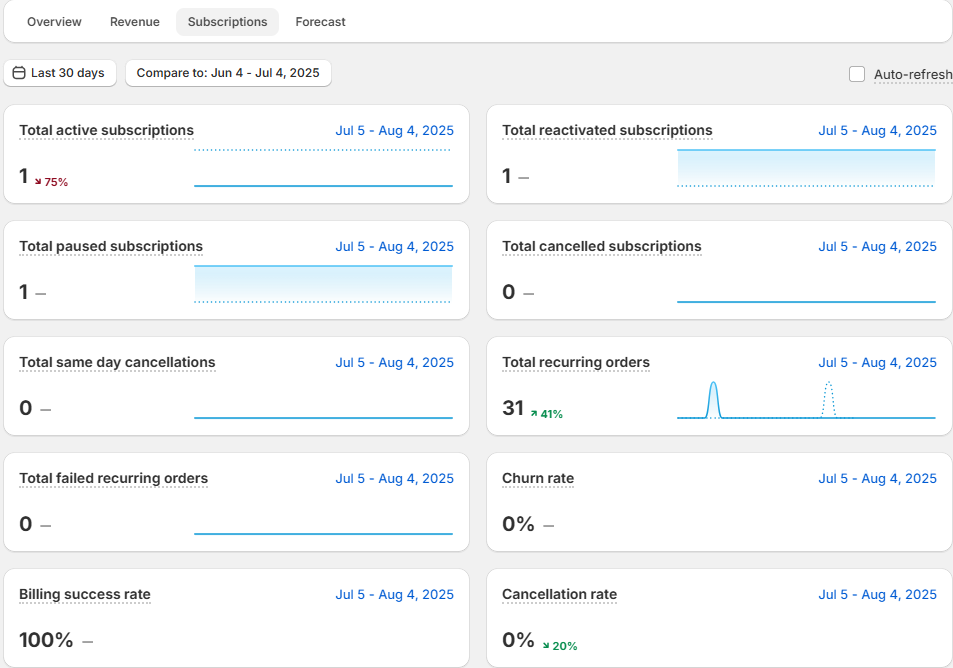
This section explains the key terms and metrics used in the Subscriptions dashboard, so you can better understand what each number means and how it reflects your subscription performance.
* **Total active subscriptions**\
The total number of subscription contracts created within the selected time range that are currently active.
* **Total reactivated subscriptions**\
The number of subscriptions that were previously paused or canceled and then reactivated during the selected period.\
Reactivations can come from the merchant portal, customer portal, or bulk automation.\
If the same subscription is reactivated multiple times within the period, it is counted **only once**.
* **Total paused subscriptions**\
The number of subscriptions that were paused during the selected period and are still in a paused state.
* **Total cancelled subscriptions**\
The number of subscriptions that were canceled during the selected period and remain canceled.
* **Total same-day cancellations**\
Subscriptions that were created and canceled on the **same day** within the selected period and are still canceled.
* **Total recurring orders**\
The number of successful recurring subscription orders processed during the selected period.
* **Total failed recurring orders**\
The number of recurring subscription orders that failed during the selected period.
* **Churn rate**\
The percentage of subscriptions lost due to cancellations during the selected period, calculated as:\
*(Subscriptions canceled during the period ÷ subscriptions active at the start of the period) × 100*
* **Billing success rate**\
The percentage of successful billing attempts compared to all billing attempts (successful + failed) during the selected period.
* **Cancellation rate**\
The percentage of subscriptions that were canceled during the selected period, calculated as:\
*((Total subscriptions − Active subscriptions) ÷ Total subscriptions) × 100*
* **Subscriptions per day**\
The number of new subscriptions created each day within the selected time range.
* **Subscribed vs. unsubscribed**\
A comparison between subscriptions that remain active and subscriptions that were canceled during the selected period.
* **Total active subscriptions over time**\
A time-based view showing how many subscriptions remained active on each day within the selected period.
> 💡 **Tip:** Pay close attention to **Churn Rate**, **Cancellation Rate**, and **Reactivations** together. A high churn rate combined with low reactivation often signals issues with pricing, billing frequency, or customer experience - giving you a clear starting point for improvement.
*If you need help, feel free to reach out to us via in-app* [***Live chat***](https://go.crisp.chat/chat/embed/?website_id=c4ae10a3-f762-4968-b35a-c931caf62a96)***,*** [***Book a call***](https://calendly.com/easto-support/30min) *or at* [***support@tech-arms.io***](mailto:support@tech-arms.io)***.***