> For the complete documentation index, see [llms.txt](https://docs.easto.io/llms.txt). Markdown versions of documentation pages are available by appending `.md` to page URLs; this page is available as [Markdown](https://docs.easto.io/features/email-notifications/customer-portal.md).
# Customer Portal
Your customers are totally able to manage their subscription contracts. This article will show you how to configure it. Let's go!!!
### 1. Introduction:
The **Customer Portal** gives customers full visibility and control over their subscriptions in one centralized place. From this portal, customers can view their subscription details, manage their active contracts, and stay informed about upcoming and past orders without needing to contact support.
Within the Customer Portal, customers can review subscription information such as products, quantities, billing and delivery frequency, shipping address, payment method, and applied discounts. They can also take self-service actions like updating contract details, pausing or canceling subscriptions, and managing upcoming orders. Additionally, the portal provides a clear history of past orders, including billing status, fulfillment status, and order details, helping customers track their subscription activity with confidence.
By empowering customers to manage their own subscriptions, the Customer Portal reduces support workload while delivering a transparent and convenient subscription experience that builds trust and long-term retention.
### 2. How to use:
{% stepper %}
{% step %}
### Go to Customer Portal
Go to Settings > Customer Portal.
{% endstep %}
{% step %}
### Select permissions
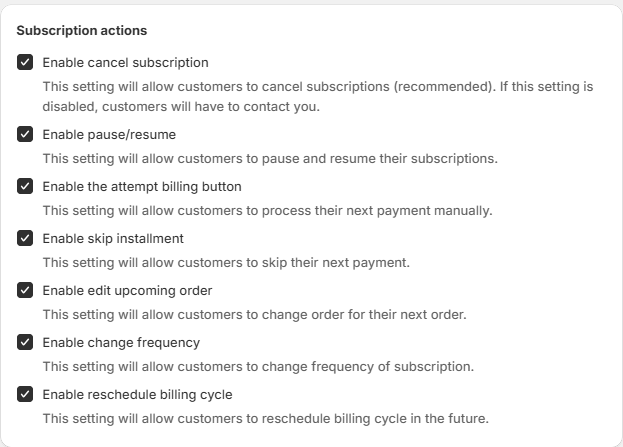
Choose the subscription actions that customers can perform on your store.
{% endstep %}
{% step %}
### View Customer Portal on your store
For instance, you can access [our demo store here (password: 1)](https://bss-subscriptions-app.myshopify.com/account) and sign in using the test account. You will see the subscriptions here
{% endstep %}
{% step %}
### View Subscription details
Your customer can Add product to their subscription, change frequency, shipping address, payment method and even add discount too! They also have the ability to activate, pause or cancel their subscription at any time!
{% endstep %}
{% step %}
### View upcoming orders
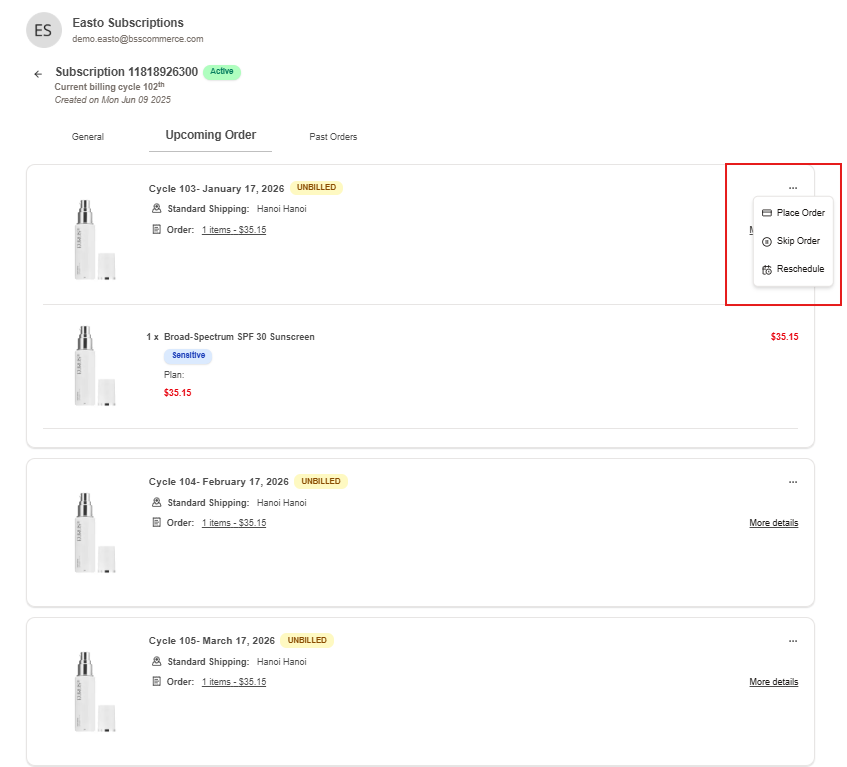
Customers can also view upcoming orders and choose to place order now, skip order or reschedule, just like you!
{% endstep %}
{% step %}
### View past order
Similarly, with past order, customers can recharge too. This help preventing unbilled cycle
{% endstep %}
{% endstepper %}
> Note: Your customers can access this URL to manage their subscription contracts:
{% hint style="info" %}
{% endhint %}
*If you need help, feel free to reach out to us via in-app* [***Live chat***](https://go.crisp.chat/chat/embed/?website_id=c4ae10a3-f762-4968-b35a-c931caf62a96)***,*** [***Book a call***](https://calendly.com/easto-support/30min) *or at* [***support@tech-arms.io***](mailto:support@tech-arms.io)***.***