> For the complete documentation index, see [llms.txt](https://docs.easto.io/llms.txt). Markdown versions of documentation pages are available by appending `.md` to page URLs; this page is available as [Markdown](https://docs.easto.io/features/email-notifications/quick-checkout-link.md).
# Quick Checkout Link
Instant purchase paths, ready to go.
### 1. Introduction:
The **Quick Checkout Link** feature allows you to create direct checkout links with pre-selected subscription products, helping customers skip the cart and proceed straight to the checkout page. These links are perfect for special promotions, landing pages, email campaigns, or one-click purchases, making it easier to boost conversions.
### 2. How to use:
To create a checkout link, follow these steps:
{% stepper %}
{% step %}
### Select Products
Use the search bar or the Browse button to choose specific product variants to include in the checkout link. You can select Purchase options and quantity as well.
{% endstep %}
{% step %}
### Apply Discount Code (optional)
If you'd like to offer a discount, create one in your Shopify admin and enter the code here. The discount will be automatically applied when the customer clicks the link.
{% endstep %}
{% step %}
### Add optional information
You can choose to add these information as well:
* Customer Information: Pre-fill customer fields like name and email to reduce friction at checkout.
* Order Notes: Add internal notes that will be included with the order.
* Additional Properties: Include any extra metadata or product-level customization needed for the order.
{% endstep %}
{% step %}
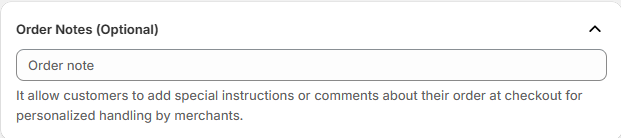
### Add order note (optional)
If you add this, customers will be able to add special instructions or comments about their order at checkout.
{% endstep %}
{% step %}
### Add additional properties
You can consider adding this so that you can collect and store custom details like personalization or special instructions.
{% endstep %}
{% step %}
### Generate link
Once all fields are completed, click **Generate Link** to create your checkout URL. You can then share this link via email, social media, banners, or landing pages.
This link is ideal for:
* Flash sales or limited-time offers
* Paid ad campaigns that drive traffic to a fast purchase
* Merchants wanting to simplify the checkout process for subscriptions
> Note: These links are intended for subscription products only, and customers must complete the checkout through the generated link to ensure correct subscription processing.
> {% endstep %}
> {% endstepper %}
*If you need help, feel free to reach out to us via in-app* [***Live chat***](https://go.crisp.chat/chat/embed/?website_id=c4ae10a3-f762-4968-b35a-c931caf62a96)***,*** [***Book a call***](https://calendly.com/easto-support/30min) *or at* [***support@tech-arms.io***](mailto:support@tech-arms.io)***.***