> For the complete documentation index, see [llms.txt](https://docs.easto.io/llms.txt). Markdown versions of documentation pages are available by appending `.md` to page URLs; this page is available as [Markdown](https://docs.easto.io/features/email-notifications/renewal-and-dunning-settings.md).
# Renewal & Dunning Settings
Handle charges your way & Take control of failed payments before they cost you customers.
### 1. Introduction:
The **Renewal & Dunning Settings** section allows you to control how subscription renewals are billed and how failed payments are handled. These settings help ensure subscription orders are processed at the right time while minimizing revenue loss from failed or declined payments.
From here, you can configure renewal rules such as inventory policies, early charge timing, time zone, and billing schedules. You can also set up a multi-phase dunning campaign to automatically retry failed payments at defined intervals, giving customers multiple chances to complete their payment while keeping the renewal process fully automated.
### 2. How to use:
{% stepper %}
{% step %}
### Go to Renewal and Dunning Settings
This is where you can configure renewal rules
{% endstep %}
{% step %}
### Configure Renewal Settings
This is where you can:
* Define inventory policies for product variants during subscription renewals.
* Set early charge hours and specify your store’s time zone to align billing schedules.
{% endstep %}
{% step %}
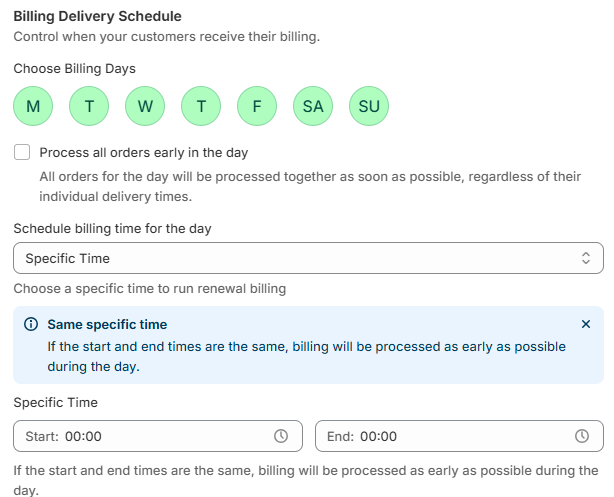
### Configure Billing Delivery Schedule
Here is where you can:
* Choose which days of the week billing should occur.
* Optionally process all orders early in the day to streamline fulfillment.
* Customize the time of day billing should take place (e.g., anytime, early morning, etc.).
{% endstep %}
{% step %}
### Configure Dunning Settings
This is where you can:
* Configure retry strategies for failed subscription charges to maximize recovery.
* Create multi-phase campaigns with adjustable retry intervals and retry limits per phase.
* Add, edit, or remove phases to tailor the dunning flow to your business needs.
* Avoid unnecessary churn by giving payments a second (or third) chance.
{% endstep %}
{% endstepper %}
*If you need help, feel free to reach out to us via in-app* [***Live chat***](https://go.crisp.chat/chat/embed/?website_id=c4ae10a3-f762-4968-b35a-c931caf62a96)***,*** [***Book a call***](https://calendly.com/easto-support/30min) *or at* [***support@tech-arms.io***](mailto:support@tech-arms.io)***.***